
Custom Azure Application Insights Telemetry Signals in Dynamics 365 Finance & Operations
After several monitoring and diagnostics tools in Lifecycle Services (LCS) were disabled in September 2024, Microsoft rebuilt these features as Monitoring and Telemetry using Azure Application Insights due to disabled these features and very limited tools in LCS I used to struggle with finding the root causes of errors like failed batch jobs, and diagnostic exceptions ..,etc so I think this new feature in Dynamics 365 Finance & Operations makes a developers life much easier because it comes with some really useful features like:
- Real-time application performance monitoring
- Diagnosing errors and exceptions
- Setting up alerts based on specific conditions
- Connecting with Power BI to analyze logs in more depth
- Support for Kusto Query Language (KQL) for querying and visualizing data
In this blog post I will explain how to configure and use custom telemetry signals such as Events, PageViews, Exceptions, and Traces using the X++ programming language.
To enable this feature follow the steps below to configure Azure Application Insights in Dynamics 365 Finance & Operations.
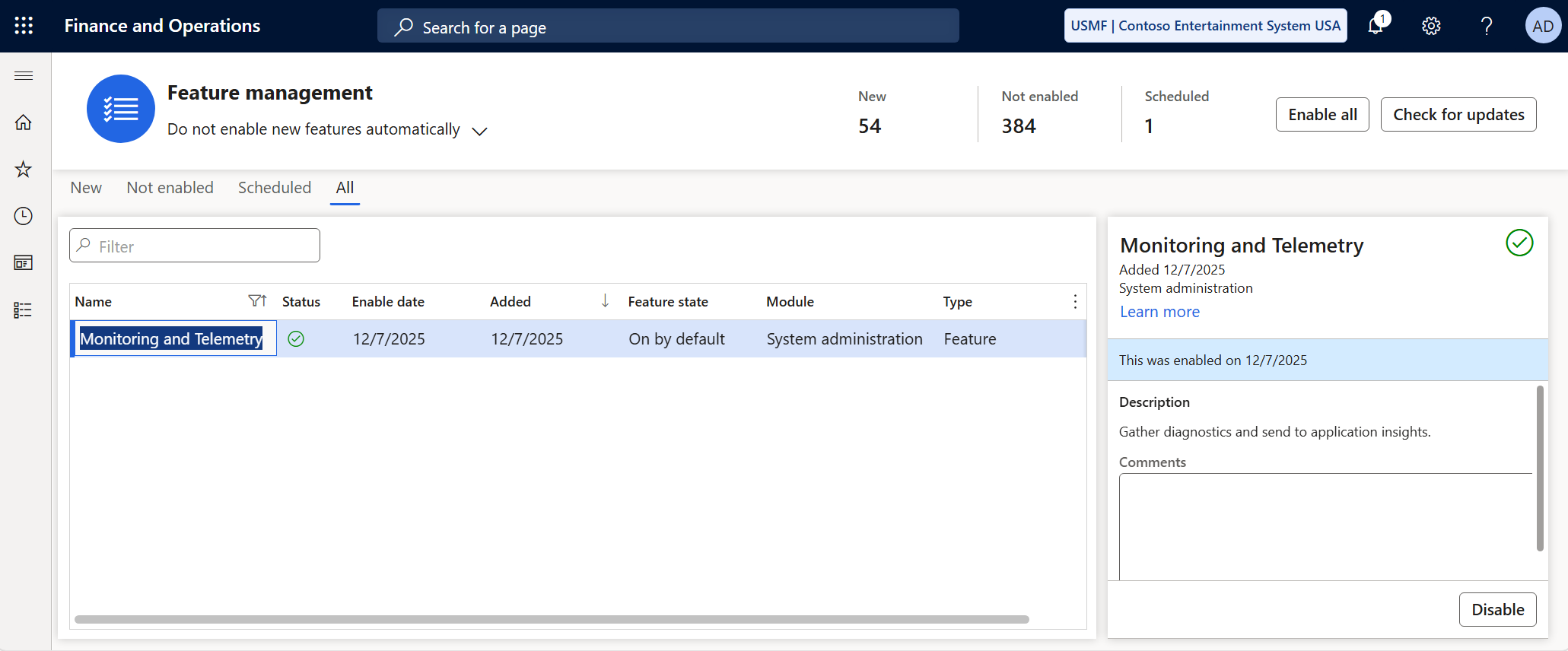
1: Open Feature Management find the Monitoring and Telemetry feature and enable it.
2: Go to System Administration > Monitoring and Telemetry parameters > Configure.
Enable the telemetry signal types you want to trigger in Azure Application Insights.
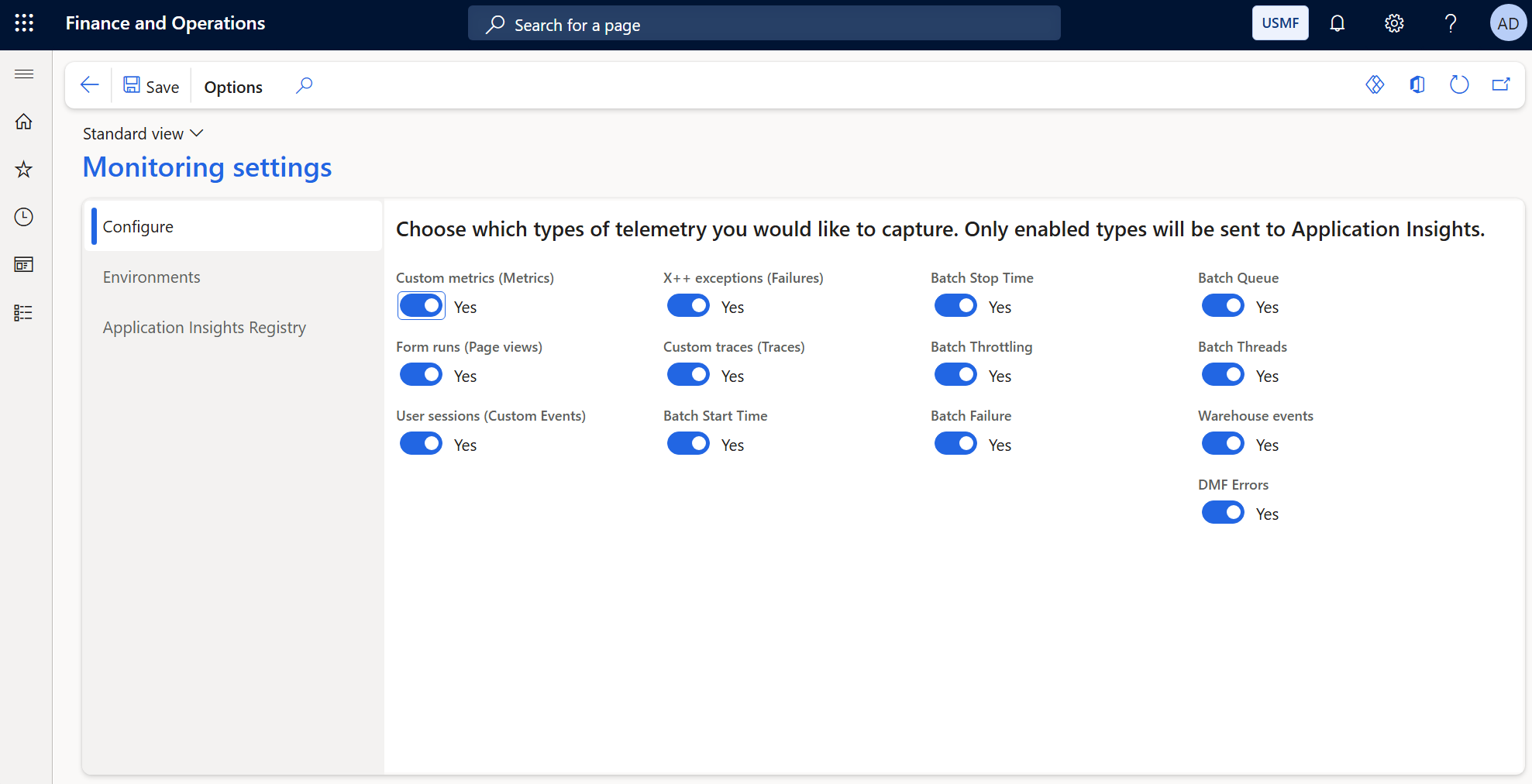
If you notice there are more telemetries visible in this environment than in yours, that’s because I manually enabled these flights (
BatchTelemetryCallstackFlight,BatchThreadInfoTelemetryFlight,BatchTelemetryConfigurationFlight) in theSysFlightingtable in the Development environment.
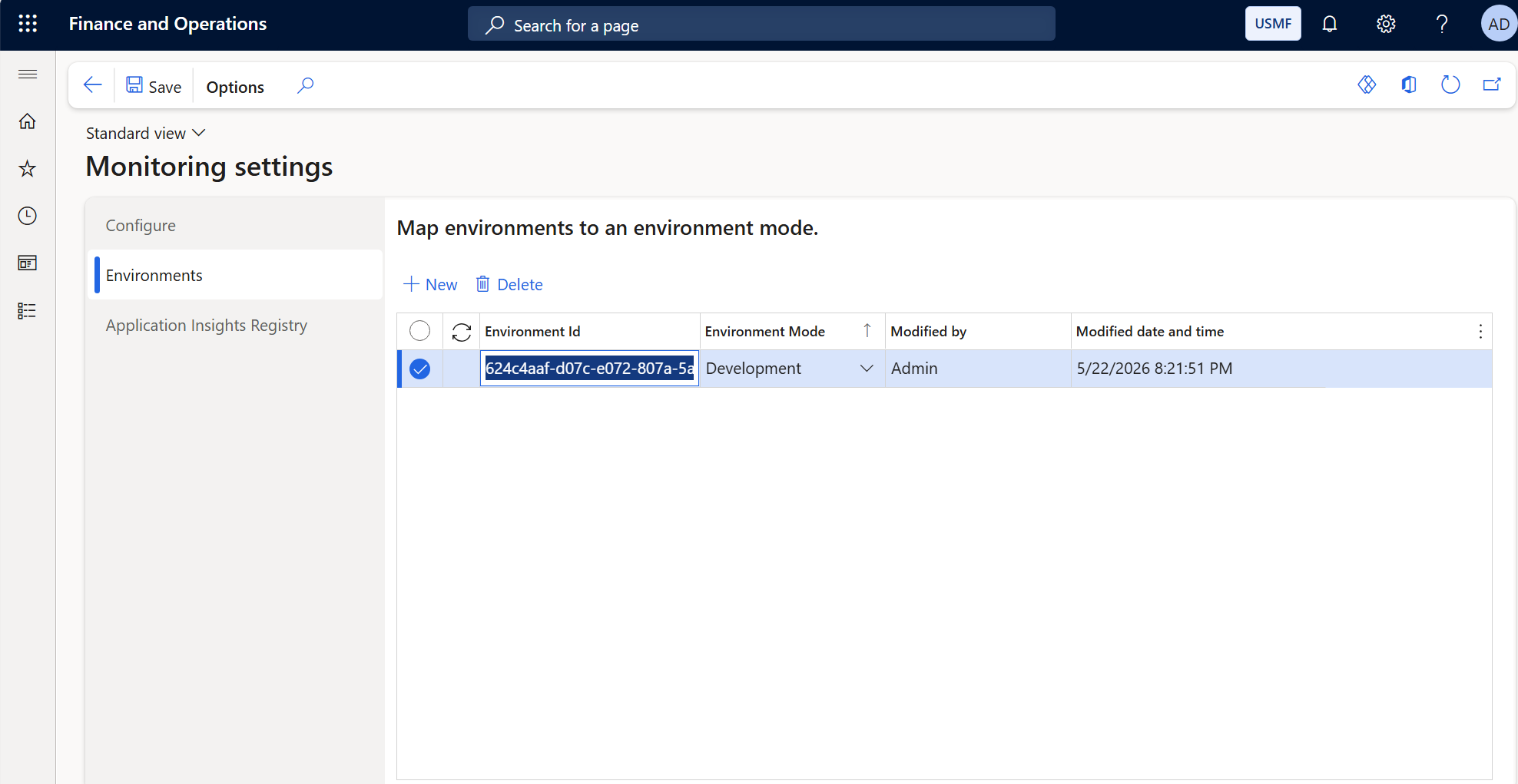
3: Open the Environment tab and select the type of Dynamics 365 Finance & Operations environment in this case I only enabled it for the development environment.
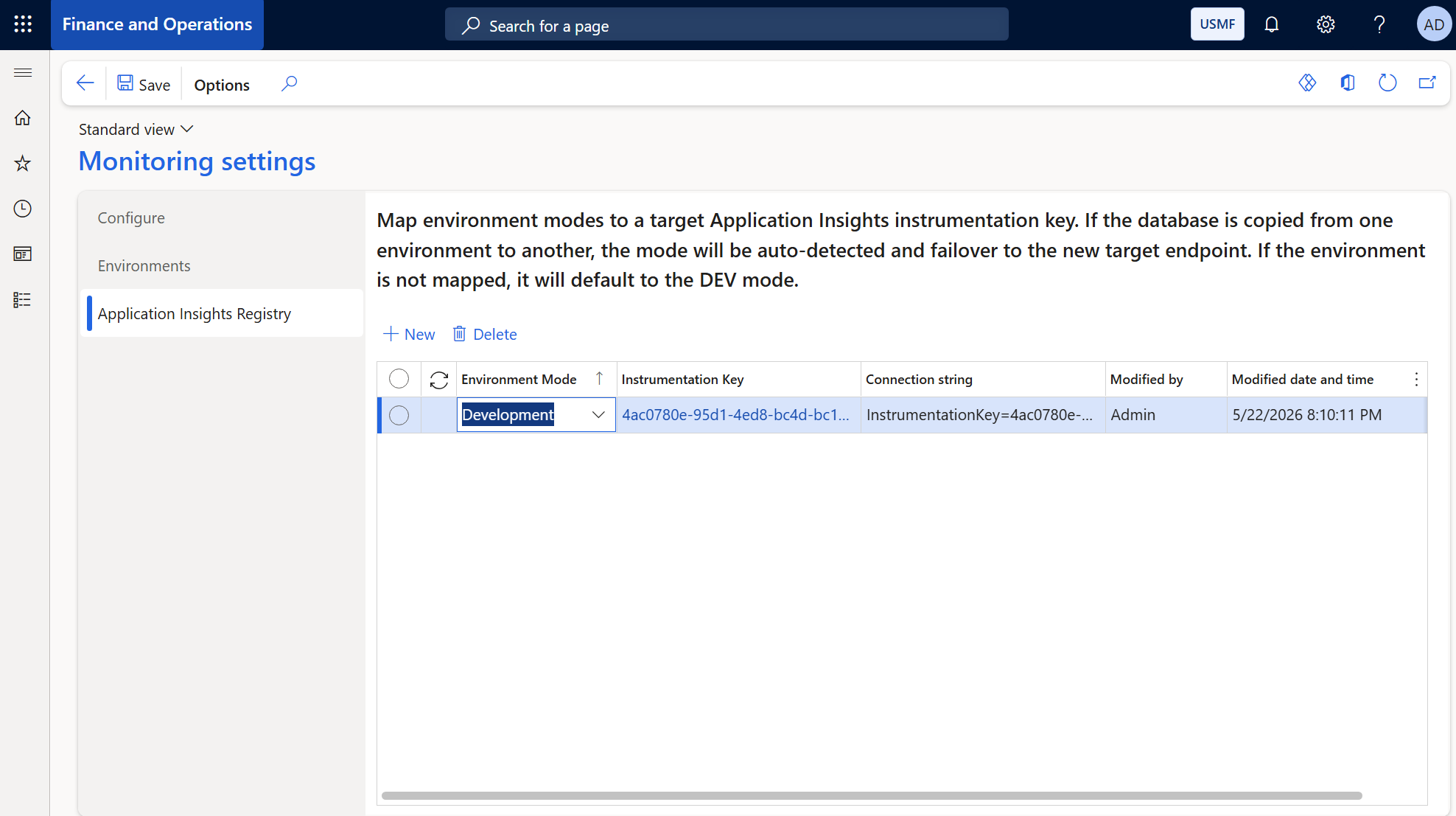
4: Open the Application Insights Registry tab. This one is very important, here you need the Azure Application Insights connection string and instrumentation key to connect and send signals between D365 F&O and Azure Application Insights.
The connection string and instrumentation key can be found on the Overview tab after creating the Azure Application Insights resource in the Azure Portal.
Using custom telemetry signals
By default once the Monitoring and Telemetry feature is enabled and the telemetry types are activated on the Configure tab (step 2) Dynamics 365 Finance & Operations sends telemetry to Azure Application Insights but we can also add our own custom telemetry signals using the X++ programming language.
1-Event (SysApplicationInsightsEventTelemetry)
We can log a custom event and send a telemetry signal to Azure Application Insights. We just need an instance of the SysApplicationInsightsEventTelemetry class and pass the payload, then use the SysApplicationInsightsTelemetryLogger class to send the event. In the following example we send information about a sales order after it’s created in the SalesTable. We define some SysApplicationInsightsProperty properties which are used to attach custom key and value metadata to a telemetry signal. We just log the (UserId, SalesId, CustAccount, CustomerName, and SalesStatus) information of a sales order.
public final class Demo_AppInsightsSalesUserIdProperty extends SysApplicationInsightsProperty
{

    public static Demo_AppInsightsSalesUserIdProperty newFromValue(UserId _value)
    {
        return new Demo_AppInsightsSalesUserIdProperty(_value);
    }

    protected container initialize()
    {
        return ['UserId', SysApplicationInsightsComplianceDataType::CustomerContent];
    }

}


public final class Demo_AppInsightsSalesIdProperty extends SysApplicationInsightsProperty
{
    public static Demo_AppInsightsSalesIdProperty newFromValue(SalesId _value)
    {
        return new Demo_AppInsightsSalesIdProperty(_value);
    }

    protected container initialize()
    {
        return [
            'SalesId', SysApplicationInsightsComplianceDataType::CustomerContent
        ];
    }

}


public final class Demo_AppInsightsSalesCustAccountProperty extends SysApplicationInsightsProperty
{
    public static Demo_AppInsightsSalesCustAccountProperty newFromValue(CustAccount _value)
    {
        return new Demo_AppInsightsSalesCustAccountProperty(_value);
    }

    protected container initialize()
    {
        return ['CustAccount', SysApplicationInsightsComplianceDataType::CustomerContent];
    }

}


public final class Demo_AppInsightsSalesCustomerNameProperty extends SysApplicationInsightsProperty
{
    public static Demo_AppInsightsSalesCustomerNameProperty newFromValue(str _value)
    {
        return new Demo_AppInsightsSalesCustomerNameProperty(_value);
    }

    protected container initialize()
    {
        return ['CustomerName', SysApplicationInsightsComplianceDataType::SystemMetadata];
    }

}

public final class Demo_AppInsightsSalesStatusProperty extends SysApplicationInsightsProperty
{
    public static Demo_AppInsightsSalesStatusProperty newFromValue(SalesStatus _value)
    {
        return new Demo_AppInsightsSalesStatusProperty(enum2Str(_value));
    }

    protected container initialize()
    {
        return ['SalesStatus', SysApplicationInsightsComplianceDataType::CustomerContent];
    }

}
We create an event handler on the Sales Order table (SalesTable). After a new sales order is created the information will be logged automatically once the event fires.
public final class Demo_SalesOrderEventHandler
{
    [PostHandlerFor(tableStr(SalesTable), tableMethodStr(SalesTable, insert))]
    public static void SalesTable_Post_insert(XppPrePostArgs _args)
    {


        SysApplicationInsightsTelemetryLogger logger = SysApplicationInsightsTelemetryLogger::instance();

        if (logger == null)
        {
            return;
        }

        SalesTable salesTable = _args.getThis();

        SysApplicationInsightsEventTelemetry eventTelemetry = SysApplicationInsightsEventTelemetry::newFromEventIdName(strFmt('Sales Id: %1',salesTable.SalesId),'New Sales Order');

        eventTelemetry.addProperty(
            Demo_AppInsightsSalesUserIdProperty::newFromValue(curUserId()));
        eventTelemetry.addProperty(
            Demo_AppInsightsSalesIdProperty::newFromValue(salesTable.SalesId));
        eventTelemetry.addProperty(
            Demo_AppInsightsSalesCustAccountProperty::newFromValue(salesTable.CustAccount));
        eventTelemetry.addProperty(
            Demo_AppInsightsSalesCustomerNameProperty::newFromValue(salesTable.customerName()));
        eventTelemetry.addProperty(
            Demo_AppInsightsSalesStatusProperty::newFromValue(salesTable.SalesStatus));


        logger.trackEvent(eventTelemetry);
    }

}
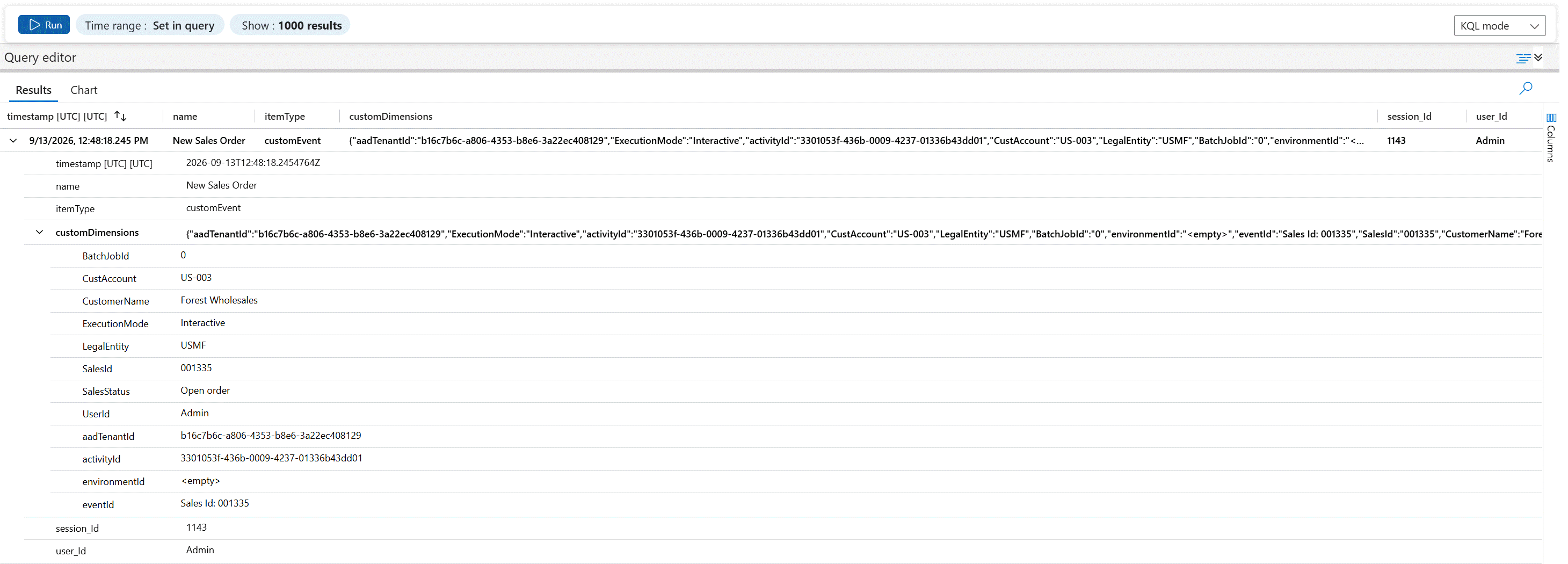
In Azure Application Insights we use the following Kusto Query Language (KQL) to filter and find the custom event logs.
customEvents
| where timestamp between (datetime(2026-09-13T00:00:00Z) .. datetime(2026-09-13T23:59:59Z))
| where name has "New Sales Order"
| project
    ['timestamp [UTC]'] = timestamp,
    name,
	itemType,
    customDimensions,
    session_Id,
    user_Id
Result:
2-PageView (SysApplicationInsightsPageViewTelemetry)
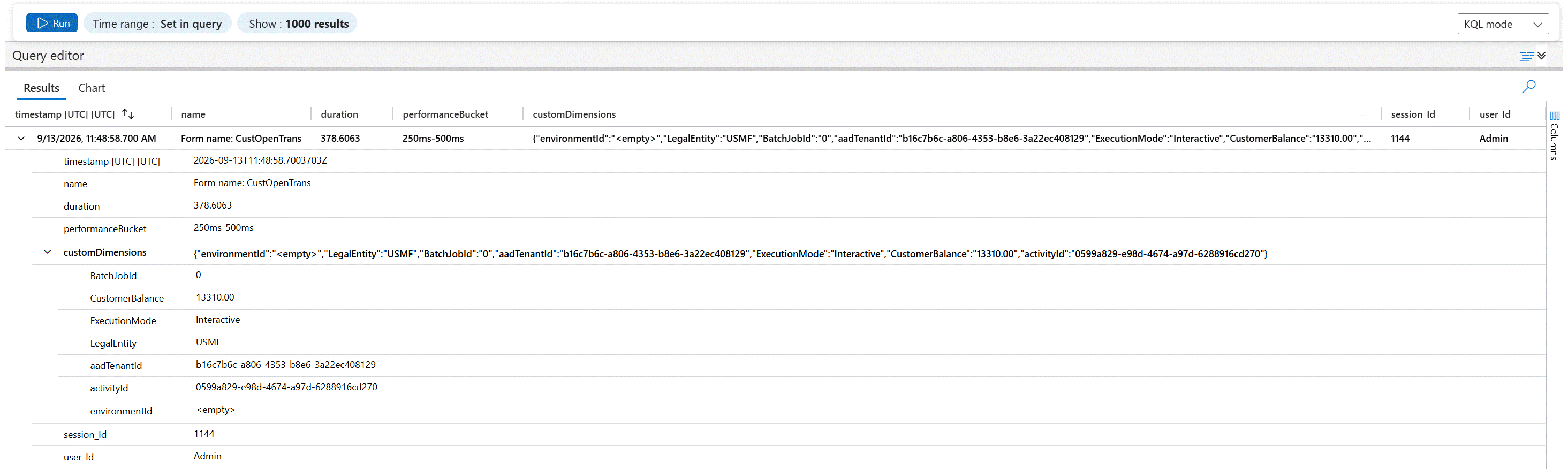
By default every opened form in Dynamics 365 Finance & Operations automatically sends a PageView event to Azure Application Insights but we can also send a custom payload alongside it. In the following example we send the Customer Balance in the Settlement of the Sales Order form to Azure Application Insights when a user open that form.
public final class Demo_AppInsightsSettleCustomerBalanceProperty extends SysApplicationInsightsProperty
{

    public static Demo_AppInsightsSettleCustomerBalanceProperty newFromValue(AmountMST _value)
    {
        return new Demo_AppInsightsSettleCustomerBalanceProperty(num2Str(_value, 0, 2, 1, 0));
    }

    protected container initialize()
    {
        return ['CustomerBalance', SysApplicationInsightsComplianceDataType::CustomerContent];
    }

}
We use CustOpenTrans_Post_run event handler to capture opend form.
public final class Demo_SalesOrderSettleTransactionsPageView
{

    [PostHandlerFor(formStr(CustOpenTrans), formMethodStr(CustOpenTrans, run))]
    public static void CustOpenTrans_Post_run(XppPrePostArgs args)
    {

        SysApplicationInsightsTelemetryLogger logger = SysApplicationInsightsTelemetryLogger::instance();
        if (logger == null)
        {
            return;
        }

        FormRun formRun = args.getThis();
        if (!formRun.args() ||  !formRun.args().menuItemName())
        {
            return;
        }


        SysApplicationInsightsPageViewTelemetry pageTelemetry = SysApplicationInsightsPageViewTelemetry::newFromPageIdName(
                formRun.instanceId(),
                strFmt("Form name: %1",formRun.args().name()),
                formRun.lifecycleHelper().GetFormLoadingDuration());


        CustTransOpen custTransOpen;


        FormControl custBalanceCtrl = formRun.design().controlName(formControlStr(CustOpenTrans, ShowCustBalance));

        AmountMST custBalance;
        if (custBalanceCtrl)
        {
            custBalance = any2real(custBalanceCtrl.valueStr());
        }

        pageTelemetry.addProperty(Demo_AppInsightsSettleCustomerBalanceProperty::newFromValue(custBalance));

        logger.trackPageView(pageTelemetry);


    }

}
In Azure Application Insights we use the following Kusto Query Language (KQL) to filter and find the custom PageView logs.
pageViews
| where timestamp between (datetime(2026-09-13T00:00:00Z) .. datetime(2026-09-13T23:59:59Z))
| where name has "CustOpenTrans"
| project
    ['timestamp [UTC]'] = timestamp,
    name,
    duration,
    performanceBucket,
    customDimensions,
    session_Id,
    user_Id
Result:
3-Exception (SysApplicationInsightsExceptionTelemetry)
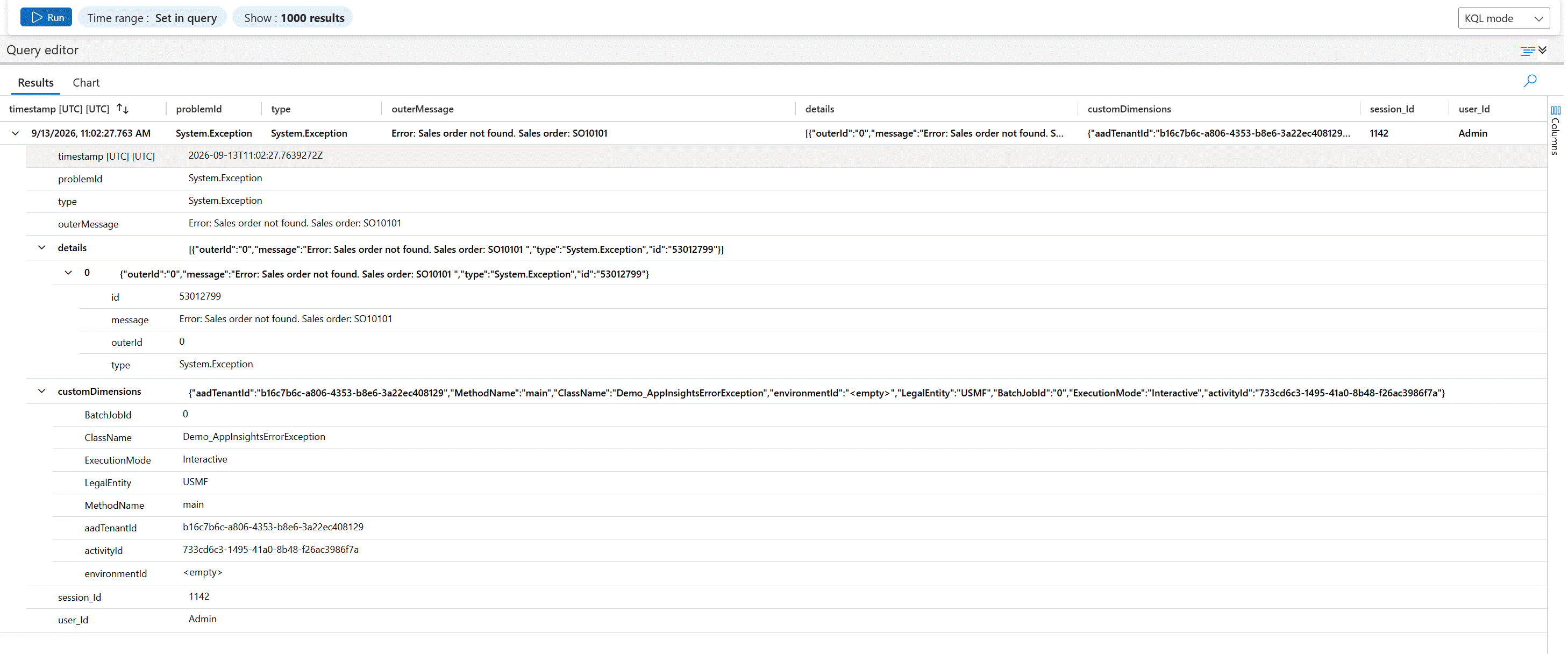
By default error exceptions in Dynamics 365 Finance & Operations are automatically sent to Azure Application Insights. The SysApplicationInsightsExceptionTelemetry class allows us to send custom information such as the call stack and exception message details in the example Class Name,Method Name and Call Stack details will be send.
public final class Demo_AppInsightsExceptionClassNameProperty extends SysApplicationInsightsProperty
{
    public static Demo_AppInsightsExceptionClassNameProperty newFromValue(UserId _value)
    {
        return new Demo_AppInsightsExceptionClassNameProperty(_value);
    }

    protected container initialize()
    {
        return ['ClassName', SysApplicationInsightsComplianceDataType::CustomerContent];
    }

}


public final class Demo_AppInsightsExceptionMethodNameProperty extends SysApplicationInsightsProperty
{

    public static Demo_AppInsightsExceptionMethodNameProperty newFromValue(UserId _value)
    {
        return new Demo_AppInsightsExceptionMethodNameProperty(_value);
    }

    protected container initialize()
    {
        return ['MethodName', SysApplicationInsightsComplianceDataType::CustomerContent];
    }

}


public final class Demo_AppInsightsExceptionCallStackProperty extends SysApplicationInsightsProperty
{
    public static Demo_AppInsightsExceptionCallStackProperty newFromValue(UserId _value)
    {
        return new Demo_AppInsightsExceptionCallStackProperty(_value);
    }

    protected container initialize()
    {
        return ['CallStack', SysApplicationInsightsComplianceDataType::CustomerContent];
    }

}
In the example it shows two type of exceptions:
- Exception::Error : This catches X++ application level errors at runtime.
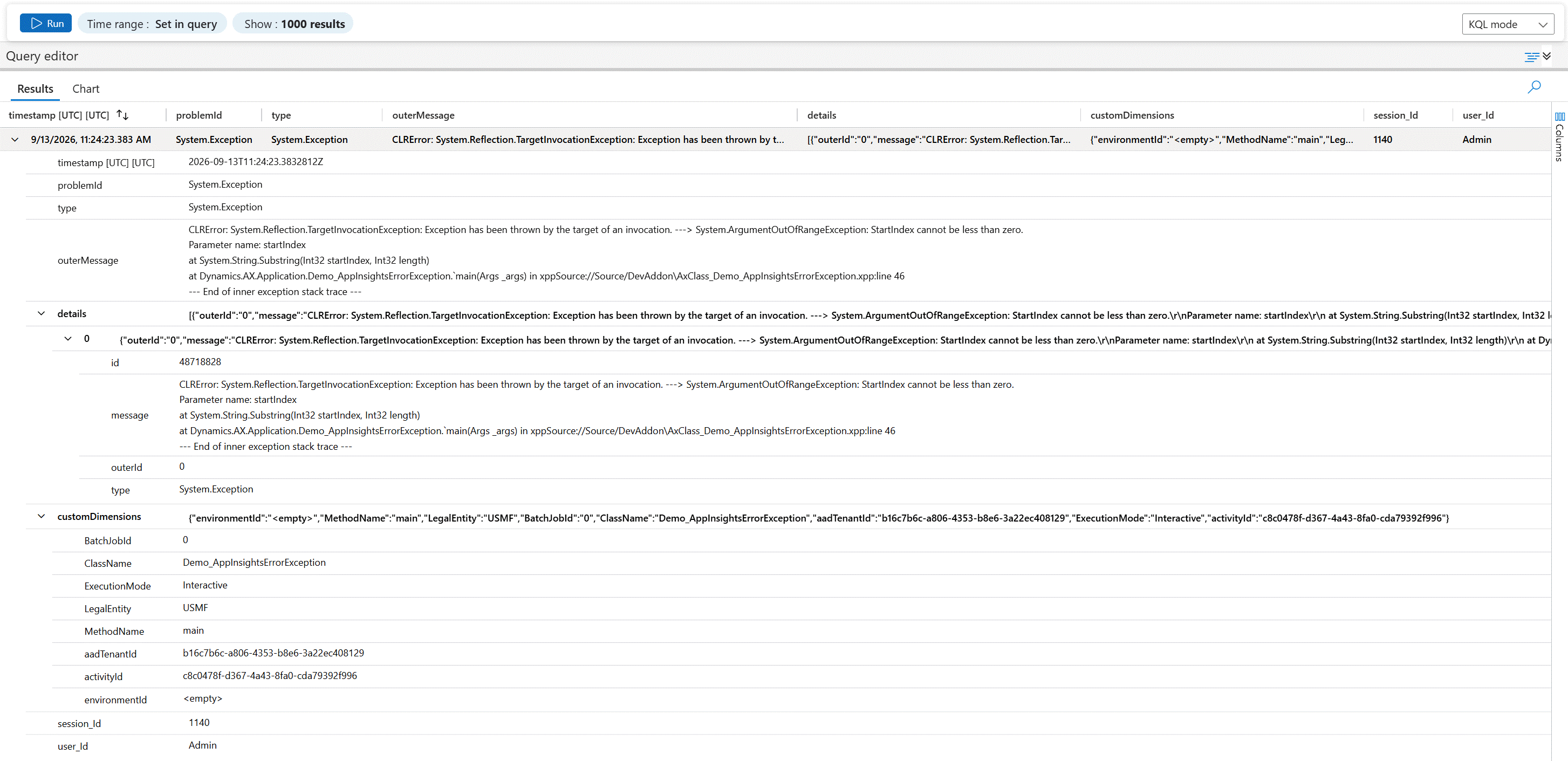
- Exception::CLRError : This catches errors that originate from the .NET/CLR interop layer.
public final class Demo_AppInsightsErrorException
{
    public static void main(Args _args)
    {
        System.String netString = "Net string.";
        System.Exception netException;

        SalesTable salesTable;
        CustTable custTable;

        SalesId salesId;
        CustAccount custAccount;

        salesId = "SO10101";

        try
        {
            select firstOnly salesTable where salesTable.SalesId == salesId;

            if (!salesTable.RecId)
            {
                throw error(strFmt("Sales order not found. Sales order: %1", salesId));
            }

            custAccount = salesTable.CustAccount;

            select firstOnly custTable where custTable.AccountNum == custAccount;

            if (!custTable.RecId)
            {
                throw error(strFmt("Customer not found. Customer account: %1. Sales order: %2", custAccount, salesId));
            }

            // CLR Error exception
            netString.Substring(-2);
        }
        catch (Exception::Error)
        {
            SysApplicationInsightsExceptionTelemetry exceptionTelemetry = SysApplicationInsightsExceptionTelemetry::newFromExceptionMessage(strFmt("Error: %1", Demo_AppInsightsErrorException::getInfologMessage()));

            exceptionTelemetry.addProperty(SysApplicationInsightsClassNameProperty::newFromValue(classStr(Demo_AppInsightsErrorException)));
            exceptionTelemetry.addProperty(SysApplicationInsightsMethodNameProperty::newFromValue(staticmethodStr(Demo_AppInsightsErrorException, main)));
            exceptionTelemetry.addProperty(SysApplicationInsightsCallStackProperty::newFromCurrentCallStack());

            SysApplicationInsightsTelemetryLogger::instance().trackException(exceptionTelemetry);
        }
        catch (Exception::CLRError)
        {
            netException = CLRInterop::getLastException();

            if (netException)
            {
                Error(netException.ToString());

                SysApplicationInsightsExceptionTelemetry exceptionTelemetry = SysApplicationInsightsExceptionTelemetry::newFromExceptionMessage(strFmt("CLRError: %1", netException.ToString()));

                exceptionTelemetry.addProperty(SysApplicationInsightsClassNameProperty::newFromValue(classStr(Demo_AppInsightsErrorException)));
                exceptionTelemetry.addProperty(SysApplicationInsightsMethodNameProperty::newFromValue(staticmethodStr(Demo_AppInsightsErrorException, main)));
                exceptionTelemetry.addProperty(SysApplicationInsightsCallStackProperty::newFromCurrentCallStack());

                SysApplicationInsightsTelemetryLogger::instance().trackException(exceptionTelemetry);
            }
        }
    }

    private static str getInfologMessage()
    {
        SysInfologEnumerator enumerator;
        SysInfologMessageStruct msgStruct;
        Set uniqueMessages = new Set(Types::String);
        str message;
        str finalMessage = "";

        enumerator = SysInfologEnumerator::newData(infolog.infologData());

        while (enumerator.moveNext())
        {
            msgStruct = new SysInfologMessageStruct(enumerator.currentMessage());
            message = strLRTrim(msgStruct.message());

            if (message && !uniqueMessages.in(message))
            {
                uniqueMessages.add(message);
                finalMessage += message + " ";
            }
        }

        return finalMessage;
    }
}
In Azure Application Insights we use the following Kusto Query Language (KQL) to filter and find the custom error exception logs.
exceptions
| where timestamp between (datetime(2026-09-13T00:00:00Z) .. datetime(2026-09-13T23:59:59Z))
| where outerMessage has "Error:"
| extend customDimensions_clean = bag_remove_keys(parse_json(customDimensions), dynamic(["CallStack"]))
| project
    ['timestamp [UTC]'] = timestamp,
    problemId,
    type,
    outerMessage,
    details,
    customDimensions = customDimensions_clean,
    session_Id,
    user_Id
Result:
In Azure Application Insights we use the following Kusto Query Language (KQL) to filter and find the CLRError exception logs.
exceptions
| where timestamp between (datetime(2026-09-13T00:00:00Z) .. datetime(2026-09-13T23:59:59Z))
| where outerMessage has "CLRError:"
| extend customDimensions_clean = bag_remove_keys(parse_json(customDimensions), dynamic(["CallStack"]))
| project
    ['timestamp [UTC]'] = timestamp,
    problemId,
    type,
    outerMessage,
    details,
    customDimensions = customDimensions_clean,
    session_Id,
    user_Id
Result:
4-Trace (SysApplicationInsightsTraceTelemetry)
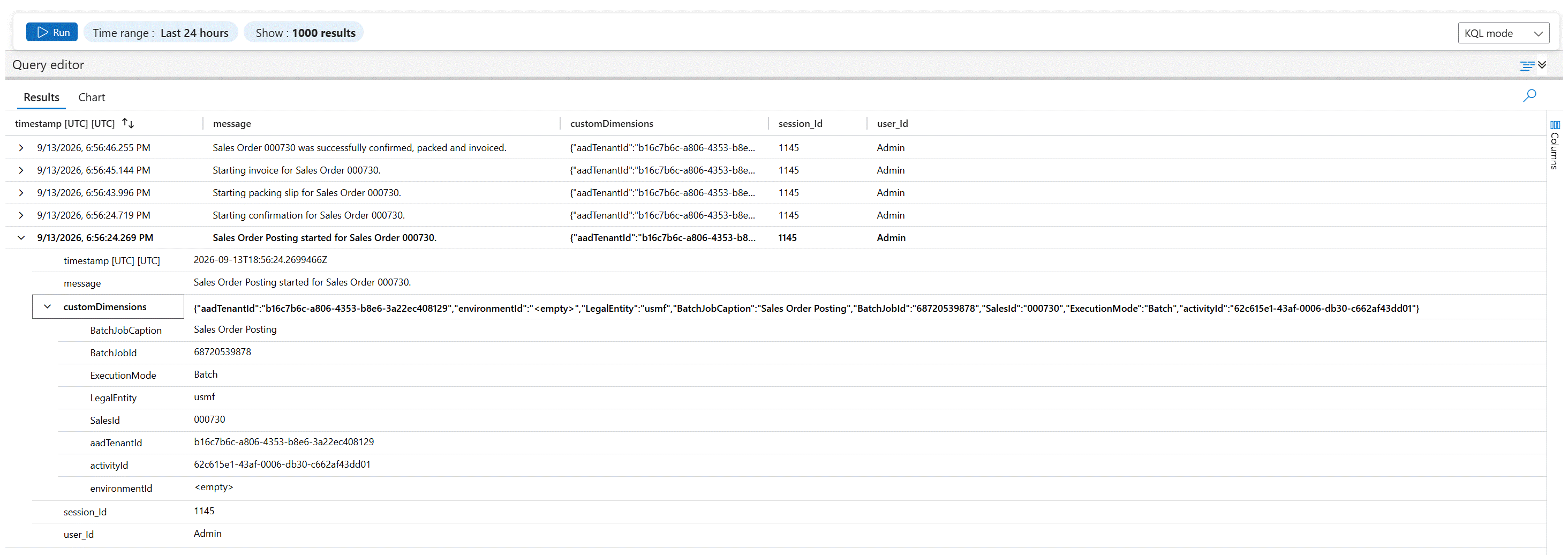
We use the SysApplicationInsightsTraceTelemetry class to send custom diagnostic or informational messages to Azure Application Insights. It’s useful for logging step by step execution details, debugging information, or general status messages while a process is running for example tracking the progress of a batch job. In this example we created a simple batch job that logs each step of a sales order’s lifecycle: Confirmation, Packing Slip, Invoice, and Completed.
public final class Demo_AppInsightsSalesIdProperty extends SysApplicationInsightsProperty
{
    public static Demo_AppInsightsSalesIdProperty newFromValue(SalesId _value)
    {
        return new Demo_AppInsightsSalesIdProperty(_value);
    }

    protected container initialize()
    {
        return [
            'SalesId',SysApplicationInsightsComplianceDataType::CustomerContent
        ];
    }

}
[DataContract]
public class Demo_OrderPostingContract
{
    SalesId salesId;

    [DataMember('SalesId')]
    public SalesId parmSalesId(SalesId _salesId = salesId)
    {
        salesId = _salesId;

        return salesId;
    }

}
public class Demo_OrderPostingController extends SysOperationServiceController
{
    public static void main(Args _args)
    {
        Demo_OrderPostingController controller;

        controller = new Demo_OrderPostingController(classStr(Demo_OrderPostingService), methodStr(Demo_OrderPostingService, processOrder), SysOperationExecutionMode::ReliableAsynchronous);

        controller.parmDialogCaption("Sales Order Posting");

        controller.parmShowDialog(true);

        controller.startOperation();
    }

}
public class Demo_OrderPostingService extends SysOperationServiceBase
{
    public void processOrder(Demo_OrderPostingContract _contract)
    {
        SalesTable salesTable;
        SalesId salesId;

        salesId = _contract.parmSalesId();

        this.logTrace(strFmt("Sales Order Posting started for Sales Order %1.", salesId), Microsoft.ApplicationInsights.DataContracts.SeverityLevel::Information, salesId);

        select firstOnly salesTable
            where salesTable.SalesId == salesId;

        if (!salesTable)
        {
            this.logTrace(strFmt("Sales Order %1 was not found.", salesId), Microsoft.ApplicationInsights.DataContracts.SeverityLevel::Warning, salesId);

            throw error(strFmt("Sales order %1 was not found.", salesId));
        }

        try
        {
            // Confirmation
            this.logTrace(strFmt("Starting confirmation for Sales Order %1.", salesId), Microsoft.ApplicationInsights.DataContracts.SeverityLevel::Information, salesId);
            this.postConfirmation(salesTable);

            // Packing slip
            this.logTrace(strFmt("Starting packing slip for Sales Order %1.", salesId), Microsoft.ApplicationInsights.DataContracts.SeverityLevel::Information, salesId);
            this.postPackingSlip(salesTable);

            // Invoice
            this.logTrace(strFmt("Starting invoice for Sales Order %1.", salesId), Microsoft.ApplicationInsights.DataContracts.SeverityLevel::Information, salesId);
            this.postInvoice(salesTable);

            // Completed
            this.logTrace(strFmt("Sales Order %1 was successfully confirmed, packed and invoiced.", salesId), Microsoft.ApplicationInsights.DataContracts.SeverityLevel::Information, salesId);
        }
        catch (Exception::Error)
        {
            this.logTrace(strFmt("Failed processing Sales Order %1.", salesId), Microsoft.ApplicationInsights.DataContracts.SeverityLevel::Error, salesId);
            throw;
        }
    }

    private void postConfirmation(SalesTable _salesTable)
    {
        SalesFormLetter salesFormLetter;

        salesFormLetter = SalesFormLetter::construct(DocumentStatus::Confirmation);
        salesFormLetter.update(_salesTable, DateTimeUtil::getSystemDate(DateTimeUtil::getUserPreferredTimeZone()));
    }

    private void postPackingSlip(SalesTable _salesTable)
    {
        SalesFormLetter salesFormLetter;

        salesFormLetter = SalesFormLetter::construct(DocumentStatus::PackingSlip);
        salesFormLetter.update(_salesTable, DateTimeUtil::getSystemDate(DateTimeUtil::getUserPreferredTimeZone()));
    }

    private void postInvoice(SalesTable _salesTable)
    {
        SalesFormLetter salesFormLetter;

        salesFormLetter = SalesFormLetter::construct(DocumentStatus::Invoice);
        salesFormLetter.update(_salesTable, DateTimeUtil::getSystemDate(DateTimeUtil::getUserPreferredTimeZone()));
    }

    private void logTrace(str _message, Microsoft.ApplicationInsights.DataContracts.SeverityLevel _severity, SalesId _salesId)
    {
        SysApplicationInsightsTraceTelemetry trace;

        trace = SysApplicationInsightsTraceTelemetry::newFromMessageAndSeverity(_message, _severity);

        if (_salesId)
        {
            trace.addProperty(Demo_AppInsightsSalesIdProperty::newFromValue(_salesId));
        }

        SysApplicationInsightsTelemetryLogger::instance().trackTrace(trace);
    }

}
In Azure Application Insights we use the following Kusto Query Language (KQL) to filter and find the custom trace logs.
traces
| where message has "000730"
| project
    ['timestamp [UTC]'] = timestamp,
    message,
    customDimensions,
    session_Id,
    user_Id
Result:
The code used in this post is for demonstration purposes only it may not be suitable for production use and should be reviewed and tested.